PIN sign-in
Add volunteers as POS Operators with a 4 to 6 digit PIN. They tap their name on the register tablet and they're in. No email or password, and they don't use an administrator or bookkeeper seat.
Set it up once. After that, the volunteers run the table and the money shows up in your books.
One for each table you run. Pick where sales and donations go, and add quick buttons like "Hot Dog $3.00".
With a short PIN or a badge on the register tablet. No GoodBooks login, no email, no password.
Cash, check, or card on a Stripe reader. A donation can go in the same sale.
Count the drawer, see if it balances, and print a deposit slip. The sales are already in your books.
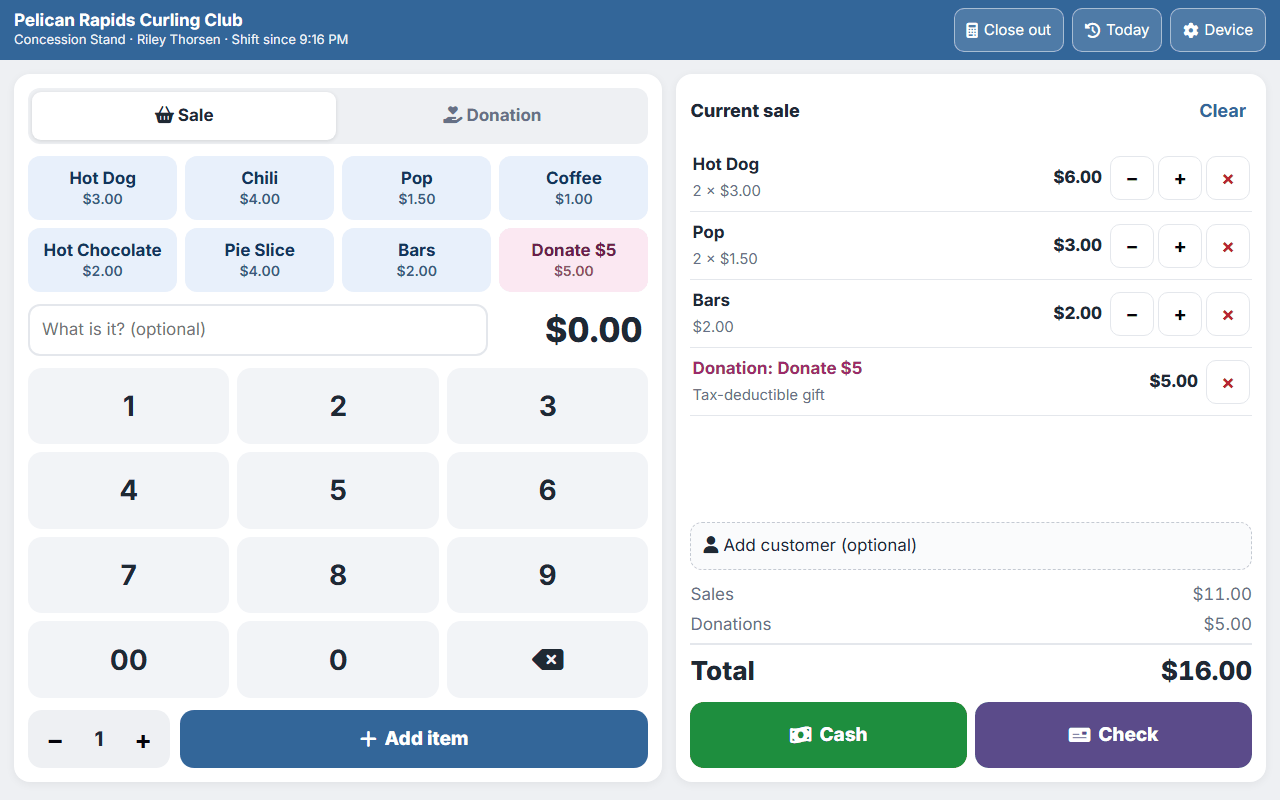
The register opens full screen on a tablet: quick buttons and a keypad on the left, the sale on the right. Anything that isn't on a button can be typed in. "Two hot dogs and a $5 donation" is one checkout, and each part goes to its own campaign.
Foundation and up. Card sales need a Stripe card reader.
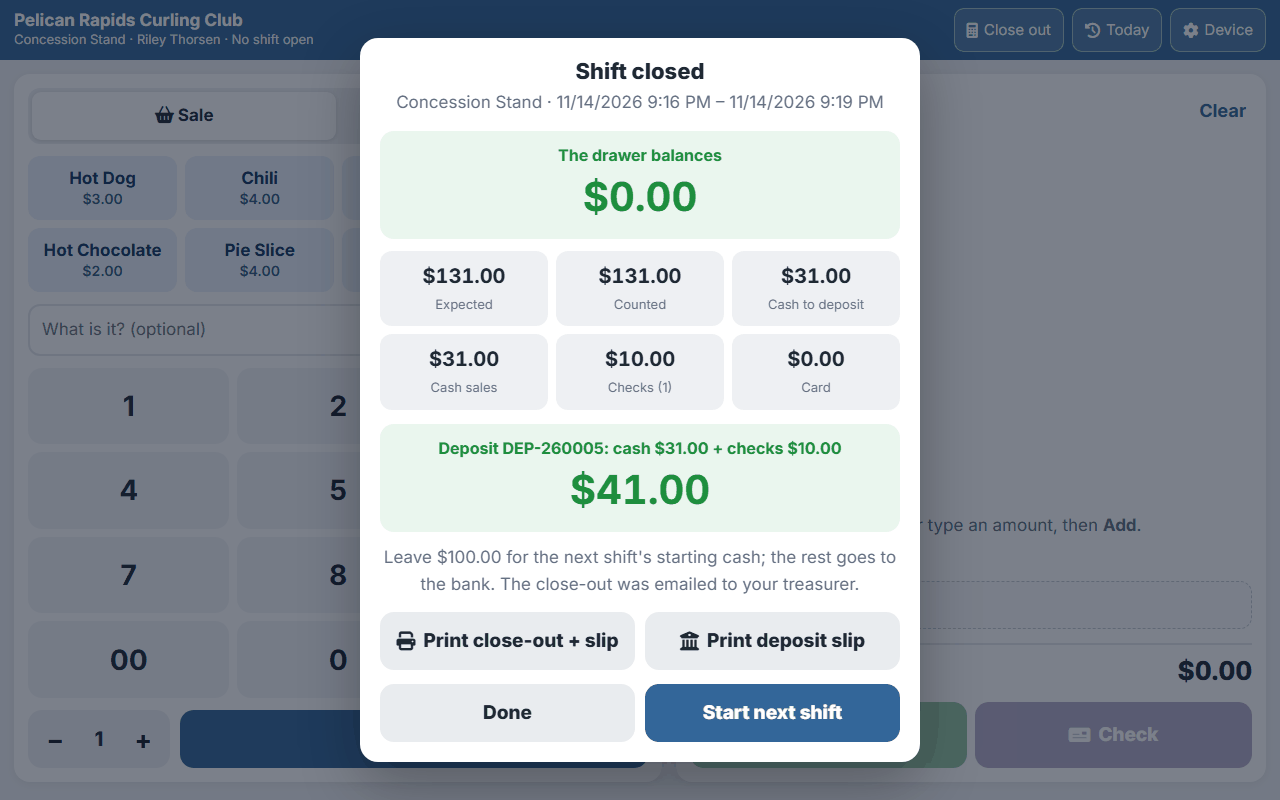
At the end of the shift the volunteer counts the drawer before the screen shows what it should hold, so the count is honest. GoodBooks shows whether it's balanced, over or short, emails the close-out to your treasurer, and puts the cash and checks into one deposit batch with a deposit slip for the bank bag.
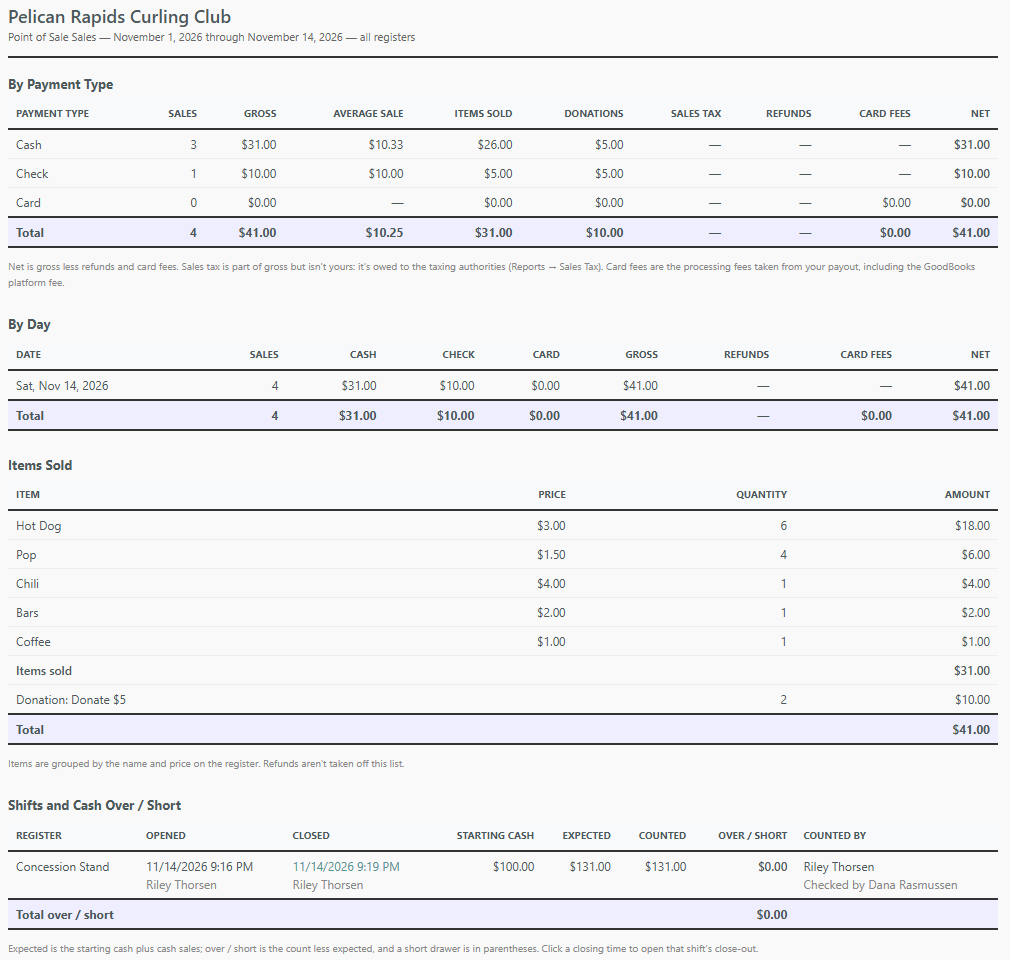
The Point of Sale Sales report shows what came in by cash, check and card, what the card fees took, how each day went, what sold, and whether every drawer counted out right. There's no second system's sales report to re-type or reconcile: the register's sales are already in your books.
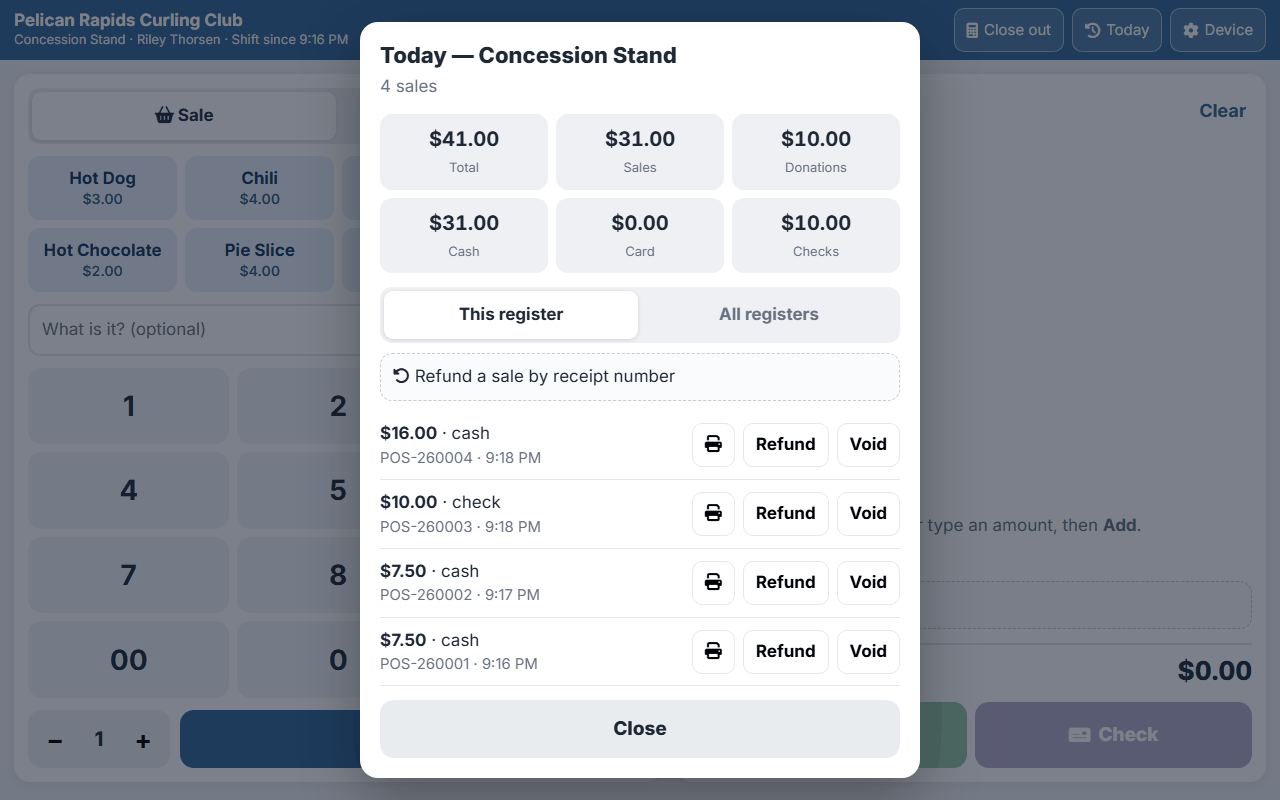
Someone wants their money back, a volunteer rang up the wrong thing, or the pop is taxable. The register handles each one and keeps the records straight, with who did it and why.
The people at the table can ring up sales, and that's all they can do.
Add volunteers as POS Operators with a 4 to 6 digit PIN. They tap their name on the register tablet and they're in. No email or password, and they don't use an administrator or bookkeeper seat.
Print a QR badge on the receipt printer or on paper, and volunteers scan it to sign in. Badges last 24 hours by default (you can change that), and a new badge cancels the old one.
PINs and badges work only on tablets you've set up for them, so a lost badge is useless anywhere else. Every sale shows who rang it up.
POS Operators ring up sales and start refunds. POS Managers also approve refunds, void mistakes and print badges.
Before the first sale, the register asks how much cash is in the drawer to make change, so the count at the end has something to balance against.
Tap Lock when you step away. The next volunteer signs in with their own PIN or badge, and the close-out lists sales by cashier.
The register runs in a web browser, so there's no special terminal to buy. Every piece is optional except the tablet.
For a one-time event, a busy weekend, or to try the register before you buy anything. We set the card reader up for your organization's payment account before the kit goes out.
The whole concession stand.
Tablet and holder, USB hub, receipt printer with paper, cash drawer with two keys, Stripe card reader, charger, extension cord and power strip.
$250 refundable deposit
Curbside and in-the-car sales, like a peach or fruit sale.
Tablet and holder, Stripe card reader and charger. No printer or cash drawer.
$150 refundable deposit
You have a tablet; you need to take cards.
A Stripe card reader and its charging cable.
No deposit
If yours isn't here, email us at hello@dogoodbooks.org.
Yes. The register and the card reader need an internet connection: the venue's Wi-Fi or a phone's hotspot. Check the signal where the table will be before the event. The Stripe Reader S710 can also use its own cellular connection where Wi-Fi is weak; Stripe charges a monthly fee for each month cellular is turned on.
The register doesn't work offline. If the connection drops, it says so instead of showing a browser error, and it can't take money, cards included, until the connection is back. Keep a cash box or the drawer key, some change and a paper tally sheet handy. When the connection returns, ring the tally into the register as cash or check sales so the shift's count still balances.
Yes, for cash, checks, cards and emailed receipts. Safari on an iPad can't talk to a USB or Bluetooth receipt printer, so receipts print through the normal print dialog (AirPrint), one dialog per receipt, and the cash drawer can't be opened from the register. We recommend an Android tablet with Chrome, which prints straight to the receipt printer and opens the drawer.
Only if you take cards. A register can be cash and checks only. For cards, use a Stripe Reader S710 or S700 (the BBPOS WisePOS E works too), ordered from your Stripe Dashboard, with online payments turned on in GoodBooks. In-person card payments cost 2.7% + 5¢ for processing plus the 0.25% GoodBooks platform fee.
Cash and checks: when the shift closes, the register puts them in one deposit batch and prints a deposit slip with your bank, the cash, each check and the total. Take it to the bank with the money, then mark the batch deposited. Card sales arrive in your bank with your regular payout, less fees, and are matched to their deposit automatically.
Yes, for part or all of a sale, right at the register. Any volunteer on the register can start one and a POS Manager approves it on the same screen with a badge or PIN. Card sales are refunded to the card; cash and check sales are paid back from the drawer, and the drawer's expected cash goes down so the count still balances. A sale rung up by mistake can be voided by a POS Manager while its shift is still open.
Yes, on Foundation and up. Nothing is taxed until you set it up, because many nonprofit fundraising sales are exempt. Each quick button can be not taxed, tax added or tax included. The tax goes to a Sales Tax Payable account instead of your income, and the Sales Tax report shows what to file. For Minnesota organizations, GoodBooks counts toward the fundraising exemption you pick: the $20,000 limit for youth and senior groups or the 24-day limit for other nonprofits. Ask your tax preparer if you're not sure what applies.
Start on the Free plan, move to Foundation when you're ready for the register. No credit card required to start.
Create Your Free AccountPrefer to see it first? Book a live 20-minute demo →