|
Monthly Update · November 2026
The One About Less Typing
Hi there — it's Paul. Last month was fundraiser season. This month is about the part of the treasurer's job nobody volunteered for: copying numbers from one place to another. The bank statement into the register. The payroll report into a journal entry. The books into the reports your board, your auditor and the IRS want at year-end. Here's what we built to take that off your plate, just in time for December.
|
|
|
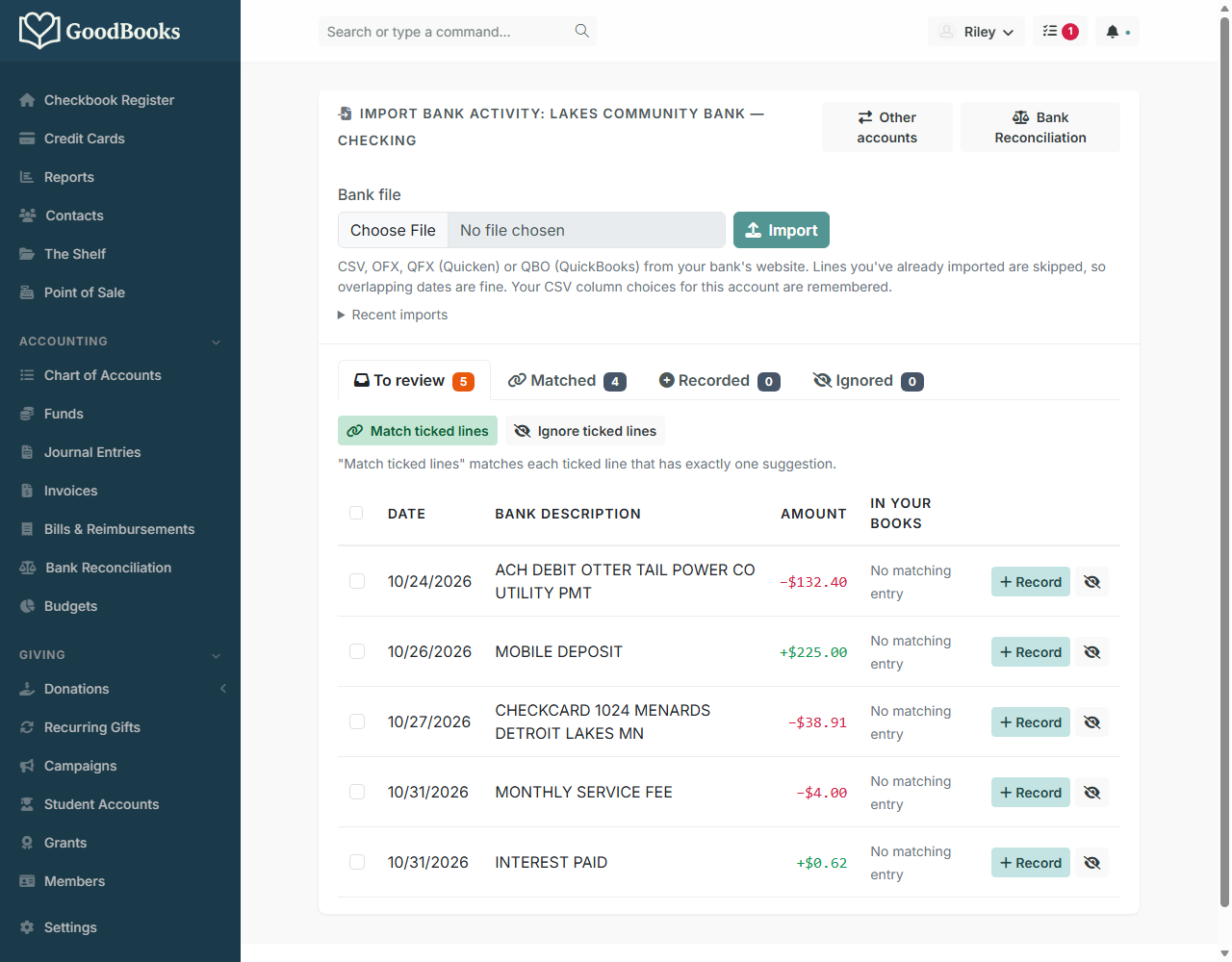
Your Bank Statement, Without the Typing
Download your bank's activity from its website (CSV, OFX, QFX or QBO, whichever it offers) and GoodBooks reads it. Lines already in your books are matched for you: checks by check number, everything else by amount within a few days. Anything new is one click to record with the account and fund you pick. Download overlapping months and nothing doubles, and every step can be undone. Best of all, next month's bank reconciliation starts with everything the bank showed already checked off.
Tell GoodBooks once how to record the electric bill or the monthly service fee, and a bank rule suggests the same account and fund every time it comes in (on Core, a rule can record it for you). Or skip the download altogether: Link your bank once, signing in at your bank so GoodBooks never sees your password, and new activity arrives on its own every day. Import and rules are on the Foundation plan and up. Core includes one linked bank account; an extra one, or one on Foundation, is $1 a month or $10 a year.
Payroll too. Upload the payroll register from Gusto, ADP, Paychex, Patriot or QuickBooks Payroll and GoodBooks posts one journal entry per pay date: wages and employer taxes by fund, taxes withheld and net pay. It remembers each person's fund, checks that every row adds up, and shows only totals, so nobody's pay is on display. Foundation plan and up.
|
|
|
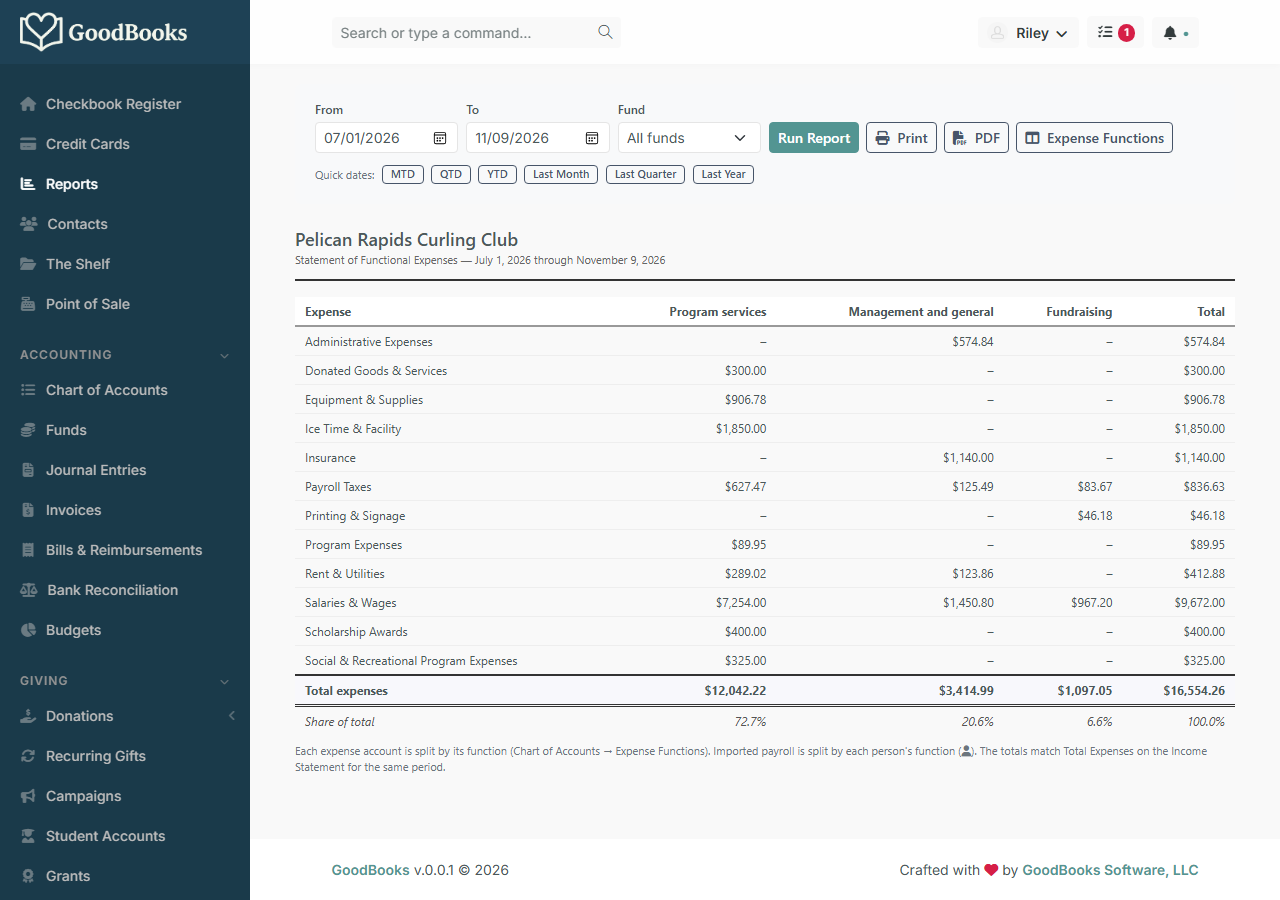
The Reports Your Board, Auditor and the IRS Ask For
Year-end brings the questions. The new Statement of Functional Expenses splits every expense across program services, management and general, and fundraising: exactly what auditors, grantmakers and the Form 990 ask for. Set each account's split once (GoodBooks suggests one to start) and the report is ready whenever someone asks. Core plan and up.
The Income Statement and Balance Sheet can now compare with last year, with the change in dollars and percent: the column every board member looks for first. Foundation plan and up. And for organizations that file the full Form 990, the new Form 990 Worksheet fills in the money parts from your books, from the Part I summary to the Schedule A public support test and the Schedule B donor list, ready to hand your preparer as a CSV or PDF. It comes with the new Pro plan ($75 a month or $750 a year), which also adds accounts payable, per-fund budgets and no limits.
|
|
|
Receipts for the Gifts That Arrive by Mail
December brings gifts of stock, grants from donor-advised funds and IRA charitable distributions, usually with a letter and no email address. Now when you pick Stock, DAF or QCD on a gift, a For the receipt box asks for the details (“40 shares of Northstar Industries (NSTR)”, the fund and grant reference, the IRA custodian) and the receipt describes the gift the way the IRS asks. Stock receipts no longer state a dollar value, and DAF and QCD receipts explain why the gift isn't deductible for the donor.
Then choose Mail receipt from the gift's Send Receipt menu: GoodBooks prints the receipt as a one-page thank-you letter and mails it First-Class in a window envelope, paid from your prepaid balance like the other mail GoodBooks sends for you. Every plan, Free included.
|
|
|
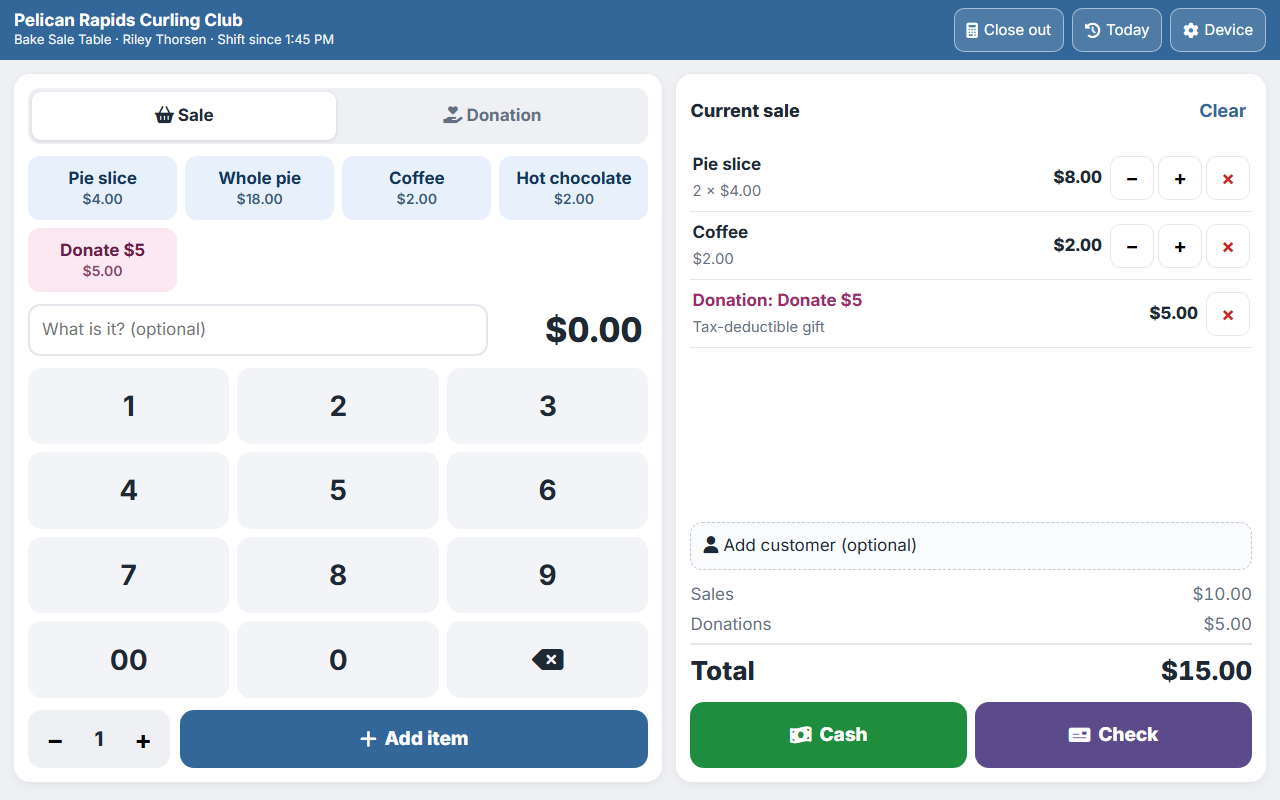
Run the Holiday Bazaar From a Tablet
Craft fairs, cookie walks, the concession stand at the holiday concert: the GoodBooks point of sale runs from a tablet with quick buttons, cash, check and card, and a donation in the same sale. This month it got easier to hand to volunteers. They sign in with a PIN or a printed badge instead of a GoodBooks login. Tap the $20 they were handed and the change shows. A manager approves a refund on the spot.
For the treasurer: sales tax goes to its own payable account (with a Minnesota fundraising exemption tracker), cash can round to the nearest nickel when pennies run short, and a Point of Sale Sales report puts the whole event on one page for the board. Foundation plan and up.
|
Your year-end checklist is already written
December 31 is about six weeks away. The GoodBooks help center has 91 step-by-step articles, and these four cover year-end:
Stuck on anything else? Type your question into the help center's search box. It usually lands right on the answer.
|
|
And the Smaller Wins
- Fixed assets. One list of everything your organization owns, with photos, QR-code asset tags and room-by-room counts from a phone: the list your insurance agent wants (Core and up; depreciation on Pro)
- Contact labels. Sort contacts into board, volunteers, sponsors or families with colored labels, and filter your lists by them (every plan)
- Gift history. Gifts from before you started on GoodBooks show on donor records and giving statements without touching your balances
- Void a gift that shouldn't have been recorded, even after it's been deposited, and the books reverse it properly
- Files on the Shelf can now be linked to a contact, so a donor's pledge letter is one click from their record
- New online-giving accounts are paid out weekly: one deposit a week and fewer bank lines to reconcile (Core is paid out daily)
- The Activity Feed (the bell icon) now shows bank rules, imports, payroll settings, fixed assets and more, each with who did it and when
See the full changelog →
|
|
|
|
Thanks for reading. Reply anytime — I read every email. Almost everything on this month's list started with a treasurer telling me what eats their evenings. If something in your month still takes longer than it should, tell me about it.
— Paul, Founder
P.S. — Giving Tuesday is December 1, less than two weeks away. Put your donate page link in your email to supporters the week before, and plan to thank every Giving Tuesday donor with a mailed thank-you card the same week. It's one click from any gift.
|
|
An update to our Terms of Service. Starting December 5, 2026, our terms spell out the fees Stripe charges your organization's Stripe account — card and bank processing, and $1.50 each time a payer's bank account is verified instantly — along with the GoodBooks platform fee. Your GoodBooks price doesn't change. Read the updated terms.
|