|
Monthly Update · October 2026
The One About Fundraiser Season
Hi there — it's Paul. Fall is when the pie sales, cookie-dough orders, and gala dinners pile up, and when the treasurer ends up holding a cash box, a roster spreadsheet, and a stack of receipts from volunteers who'd like their money back. This month's updates are about that pile: fundraisers your volunteers can run themselves, a clean answer to "so how much did we make?", a better way to pay people back, and a thank-you card in the mailbox for everyone who helped.
|
|
|
Sell Tickets, Then Check Guests In From a Phone
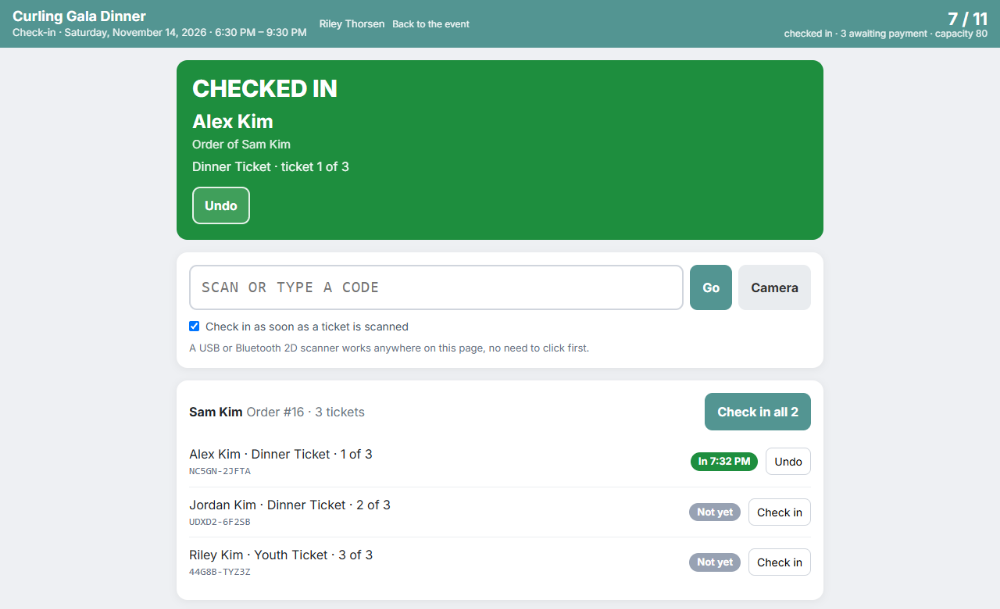
Any campaign can now sell event tickets: a dinner, a concert, a gala. Set your ticket types and prices (a "Table of 8" counts as eight seats), a capacity, and free tickets for sponsors or speakers. Every guest gets their own QR-code ticket by email, and the part of the price that's tax-deductible is worked out for their receipt.
At the door, a volunteer opens the check-in page on a phone and scans tickets with the camera, or plugs in an inexpensive barcode scanner. They can take cash or a check from guests who haven't paid, find someone by name, and keep checking people in even when the hall's Wi-Fi gives up. Volunteers sign in with a six-digit PIN, not a GoodBooks login. Still selling cookie dough or wreaths instead? The same fundraiser page takes item orders with a personal link for every student. Foundation plan and up.
|
|
|
"So How Much Did the Pie Sale Actually Make?"
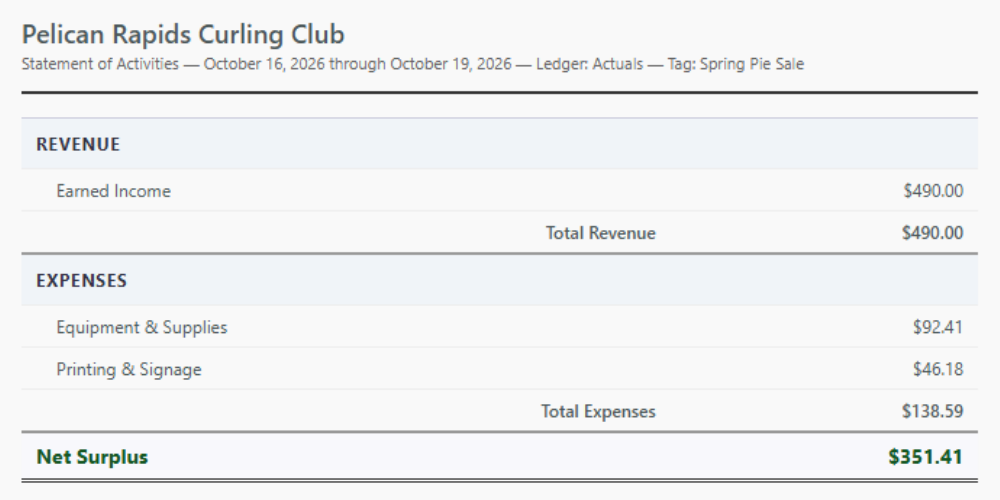
Every board asks it, and the honest answer used to take an evening with a calculator. Now there's one button on the fundraiser: it shows what came in, what you spent on it (supplies, signs, printing) by account, and the net. When you write the check for pie tins or charge the posters to the club card, tag it to the fundraiser and it lands in the right total. Foundation plan and up.
And your fundraiser chair can run the whole thing without the keys to your books. The new Fundraiser Manager role sees the fundraisers (items, tickets, orders, check-in, deposit slips, and that P&L) and nothing else: no donors, no bank register, no settings. Everyone's menu now shows only what their role can open.
|
|
|
Pay Volunteers Back Without the Shoebox
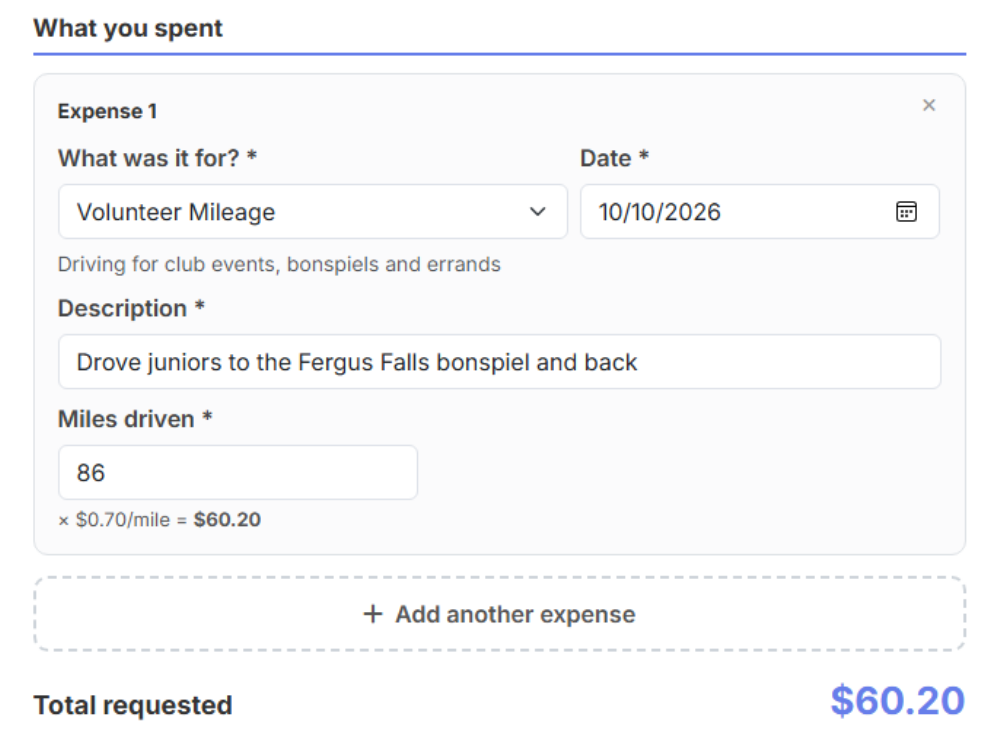
Turn on expense reimbursements and your organization gets a simple web page volunteers can use from their phone: what they bought, a photo of the receipt for each line, and miles driven at your rate. No GoodBooks login needed. Requests reach you numbered, an approver signs off (nobody can approve their own), and the volunteer gets an email when it's approved and again when it's paid.
Pay by printed check, handwritten check, ACH, or debit card, and the register entry carries one PDF with the request, the mileage log, and every receipt: exactly what your auditor will ask for. The same screen handles ordinary vendor bills you want to pay later. Foundation plan and up.
|
|
|

Thank-You Cards That Mail Themselves
A real card in the mailbox does more to bring a donor back than any email. GoodBooks can now print and mail a thank-you postcard for you: pick one of three designs or make your own, write your message once, and from then on it's one click from any gift. Each card is filled in with the donor's name and gift and goes out First-Class the next business day. Thank one donor, or everyone who bought a pie last week, in one go.
The same service handles the rest of your mail. In January, mail every donor their giving statement straight from Annual Giving Statements. Mail an invoice with a QR code to pay online. And mail a check to a vendor or a volunteer, printed on your own bank account, with no stamps and no trip to the post office. You pay as you go from a prepaid balance you top up by card, and you see the price before anything is mailed. Cards, statements and checks work on every plan, Free included, and if you joined in the last six months your first two cards are on us.
|
Three things to do before the holiday rush
Put your reimbursement link in your next volunteer email, so November's receipts arrive the easy way. Give your fundraiser chair the Fundraiser Manager role instead of your password. And if you're hosting a holiday dinner or concert, set up the tickets now: the check-in page is worth a five-minute practice run before the night. Everything that's new, in one place →
|
|
And the Smaller Wins
- A shorter menu. The left menu went from about 27 links to 17, and the nine settings pages are now cards on one Settings page
- Recurring gifts with renewal reminders and a sign-up page for sustaining donors (Foundation and up), and fully automatic monthly or yearly giving on Core
- Donated goods and services can now go into your books, not just onto a receipt
- Transfer Between Funds moves money from one fund to another and shows it as a transfer, never as income or an expense
- Made a mistake in last month's bank reconciliation? You can now undo the latest one and redo it
- Customer statements for organizations that invoice, with "Pay online" links, one at a time or to everyone with a balance
- Type a report's name in the search box at the top of any page to open it
- Inactive accounts stay out of the way in your chart of accounts until you flip a switch to see them
- Buttons that save or send something now show a spinner and can't be pressed twice, so nothing goes out double
- An invisible security check now guards sign-in, sign-up, and every donation and payment page, which stops scripts from testing stolen cards on your donate page
See the full changelog →
|
|
|
|
Thanks for reading. Reply anytime — I read every email. The fundraiser tools above started with a booster club asking for help with its fall sale, and a lot of this month's list came from treasurers telling me what eats their evenings. If something in your month is that annoying, tell me about it.
— Paul, Founder
P.S. — Giving Tuesday is December 1, five weeks from today. If your donate page still only takes cards, bank-account giving is one switch under Settings → Online Payments, and its fee stops growing at $5 on the big year-end checks. Then send every Giving Tuesday donor a thank-you card the same week.
|